
AI Home Decor: Interior Design
TOMODEV JSCHouse & Home
0.00.00 Reviews
- Version
- 1.0.7
- Installs
- 10.00K
- Age Rating
- Everyone
Screenshots
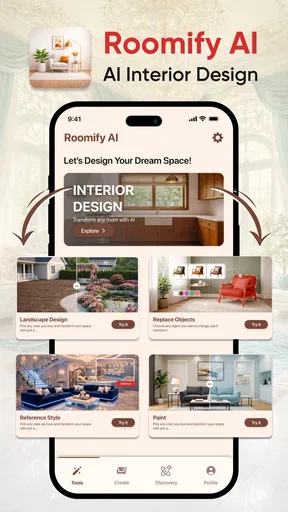
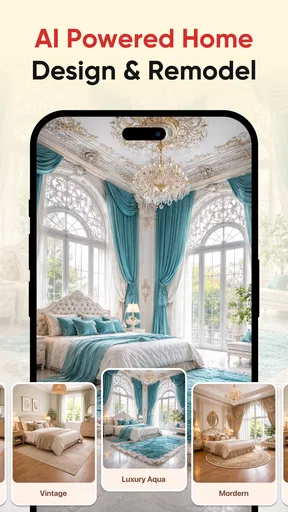
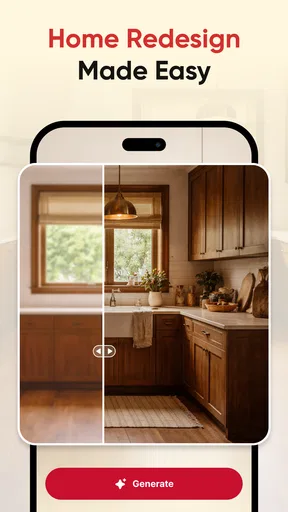

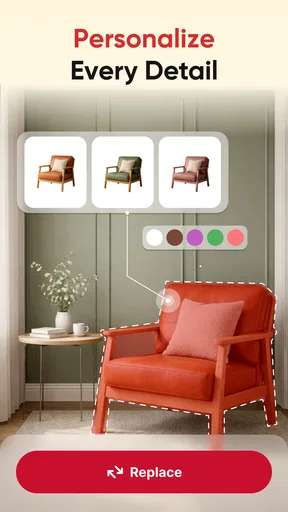
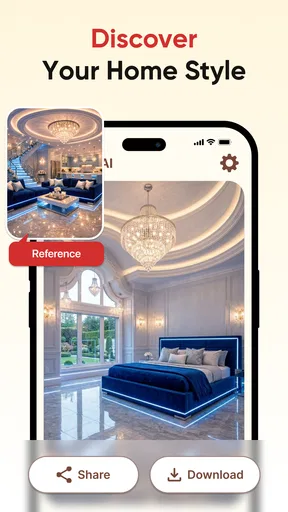
Our Review of AI Home Decor: Interior Design
 Analysis by Appyee
I tried AI Home Decor: Interior Design as a practical way to explore changes around a home without immediately moving furniture, buying paint, or opening a complicated design program. It is a free home-and-garden app from TOMODEV JSC, aimed at turning ideas for interior spaces, exteriors, and gardens into visual redesign concepts. My overall impression is that it works best as a fast idea generator: useful when I know a room feels wrong but cannot yet explain what I want to change.
The app is listed for Everyone, which makes it approachable for a household where different people may want to experiment with a shared tablet or phone. That does not make every generated suggestion suitable for every age or every budget, though. I would treat the images as inspiration rather than professional plans, measurements, or a final shopping list. That distinction matters, especially when several people are using the same device and may interpret a polished visual result as a promise of what a real renovation will look like.
How it fits into a shared household design routine
I find a shared design routine works best when everyone treats the images as conversation starters, not votes that automatically decide what changes. Before comparing ideas, agree on the room’s main need and what must stay; then each person can explain which details matter to them. That keeps a quick visual experiment focused and makes the next discussion about practical choices rather than whose favorite picture wins.
One device, several opinions
The most convincing use case for me is a small household decision that has become strangely difficult. Imagine a living room with an old sofa, a bare wall, and too many competing ideas. One person wants a warmer, traditional look, another prefers clean modern lines, and someone else is thinking about storage rather than decoration. Instead of arguing from memory, each person can use the app to explore a different direction and compare the results together.
That makes the app more useful than simply browsing finished rooms online. A general image search may show beautiful spaces, but those examples often have different proportions, lighting, and furniture arrangements. A redesign tool starts from the room or area being considered, so the conversation can stay closer to the actual home. I would still keep expectations grounded, but seeing several visual possibilities can help a household agree on a mood before spending money.
It is also handy for smaller decisions. I could use it before choosing between a calm neutral scheme and a stronger color approach, or before deciding whether a neglected corner should become a reading area, a display space, or something more functional. For a garden or exterior, the same process can make an empty frontage feel easier to discuss. The value is not that the app settles the decision; it gives everyone something concrete to react to.
A better way to compare ideas
When several people are involved, I would avoid changing the room randomly after every suggestion. A more useful routine is to start with one clear goal, such as making a narrow room feel calmer, then create alternatives that differ in only one broad direction. For example, one version might focus on lighter colors, another on natural textures, and a third on stronger contrast. This makes the discussion more meaningful than collecting unrelated images.
There is a subtle advantage here: the app can expose disagreements that are really about priorities. A person who says they want a “modern” room may actually care about less visual clutter, while another may mean darker colors and sharper furniture. Looking at generated concepts can reveal that difference quickly. I found that kind of conversation more productive than using style labels alone.
My tip is to save or show the most useful results side by side, then discuss what should be kept from each one. A generated room may have the right atmosphere but the wrong furniture placement, while another may suggest a better layout but an unsuitable color palette. Treating the images as a menu of ideas, rather than choosing one image as a complete answer, produces a more realistic household plan.
Keeping the setup honest
The quality of any redesign depends heavily on the starting material and the way the request is framed. Before using a room photo, I would tidy only the areas that affect the design decision. There is no need to stage the entire home, but loose objects, temporary clutter, or people standing in the frame can make the result less useful. A clear view of walls, floors, windows, and major furniture gives the app a better basis for suggesting a direction.
I would also decide what must remain before asking for a redesign. If the sofa, dining table, flooring, or built-in cabinets are staying, that constraint should guide how I judge the result. Otherwise, it is easy to become excited by a version that quietly replaces the most expensive or least practical elements. This is particularly important in a shared household, where one person may focus on appearance and another knows which items cannot realistically be moved.
For an exterior or garden, the same caution applies. A concept can make a space look more finished by introducing plants, surfaces, or decorative elements, but the real location may have shade, drainage, access, or maintenance issues that are not obvious in an image. I would use the app to choose a direction, then check the physical conditions separately before committing to materials or plants.
Account boundaries and shared-device habits
Because the app may be used by more than one person on a household device, I would establish a simple boundary before starting: decide whose room or project is being explored and who is allowed to make decisions from the results. This is not about restricting creativity. It prevents a child, guest, or partner from treating a casual experiment as approval for a real change.
I would also avoid mixing unrelated rooms in one session if the device is shared. A bedroom makeover, a garden concept, and a rental apartment idea can quickly become difficult to distinguish when people return to the app later. Naming the project aloud or keeping a short note outside the app can help everyone remember what each result was meant to show. That small habit is more valuable than generating a large number of designs without context.
There is another practical boundary around privacy. Interior photos can reveal personal belongings, family photographs, documents, or views through windows. I would remove or cover anything sensitive before using a shared device, especially if other people may handle the phone afterward. The app is about visual design, so there is no reason to include private details that do not help explain the room.
What the app is good at, and where it stops
Its strongest role is early-stage exploration. When I am stuck between several broad looks, a quick visual transformation can help me identify what feels appealing. It is also useful for people who find professional design vocabulary intimidating. Instead of describing a “soft contemporary scheme with restrained contrast,” I can respond to an image and say that I like the brighter walls, the simpler furniture, or the more welcoming entrance.
It is less suitable as a substitute for an architect, contractor, landscape professional, or interior designer. A visual concept does not establish accurate dimensions, structural safety, electrical requirements, building regulations, ventilation, or product availability. Even an attractive room can contain choices that would be awkward in daily life. A household should be especially careful when the proposed change affects stairs, bathrooms, kitchens, heating, outdoor surfaces, or anything that must support weight.
This limitation is not a flaw unique to this app; it is the normal trade-off of fast AI visualization. The convenience comes from reducing the distance between a photo and a new idea. The cost is that the image may simplify reality. I would use the result to ask better questions, not to skip the questions that protect a budget or a family’s safety.
Working with children and younger household members
The Everyone age context makes the app feel suitable for casual family participation, and I can see a child enjoying the chance to imagine a brighter bedroom, a themed play area, or a more colorful garden. Used together, it can turn decorating into a creative activity rather than a purely adult decision. A younger user may also notice possibilities that adults overlook, such as a cozy corner or a more playful use for an empty wall.
At the same time, I would keep an adult involved when the images lead toward real purchases or changes. Children may focus on dramatic visual elements without considering cleaning, durability, storage, allergies, or whether a design leaves enough clear space to move around. The app can support the conversation, but it should not be treated as an independent authority on what belongs in a child’s room.
Trust matters for older children and teenagers too. If they use a shared phone, I would explain that an experiment is not automatically a request being approved. That simple expectation avoids disappointment and keeps the tool from becoming a source of conflict. It also encourages them to present a complete idea: what they want to change, what should stay, and how the result would work in everyday life.
Handling costs without confusing inspiration with approval
The app itself is free to install, but it includes in-app purchases ranging from around three dollars to around forty dollars per item. In a shared household, that is a reason to agree on purchasing boundaries before everyone starts exploring. A visually appealing result can create enthusiasm quickly, and a child or guest may not understand that some actions can lead to a charge.
I would separate two decisions: whether a design idea is worth keeping, and whether any paid app item is worth buying. The first can happen during a family discussion; the second should be handled by the person responsible for the device or household spending. This keeps the creative part open while avoiding accidental purchases or the assumption that a generated concept justifies extra spending.
There is also a larger budget lesson. A design can suggest a new sofa, fresh flooring, decorative lighting, or extensive planting, but those items have very different costs and maintenance demands. Before acting on a result, I would write down the changes in priority order and estimate them independently. Often the most useful part of an image is a low-cost adjustment, such as rearranging furniture or changing the balance of color, rather than the expensive centerpiece that first attracts attention.
How it compares with familiar alternatives
The usual alternative is browsing room photos, catalog pages, or social media boards. Those sources are better when I want to study real products, see how materials age, or find a style reference from a professional project. They are weaker when I need to imagine a change in my own room. AI Home Decor: Interior Design sits between inspiration browsing and hands-on planning: it gives a quicker bridge from the existing space to a possible new look.
Another alternative is traditional design software. That is the better choice when accurate floor plans, furniture dimensions, repeated revisions, or technical control matter. It usually requires more time and patience, however, and a casual user may spend more energy learning the tool than thinking about the room. This app is more approachable for a first conversation, while dedicated software becomes more valuable once the household has settled on a direction.
Hiring a professional remains the stronger option for a complex renovation or a space with technical constraints. A designer can ask questions the image cannot, notice practical problems, and coordinate a coherent plan. I would choose this app instead when the decision is still exploratory, the project is modest, or I need help expressing a preference before speaking with a professional.
Version, access, and everyday practicality
The current version is 1.0.7 and it requires Android 8.0 or later. That makes it accessible on many older Android devices, although the experience will still depend on the phone or tablet’s camera, screen, storage, and general performance. I would prefer a larger screen for comparing concepts with another person, while a phone is more convenient for capturing a room or showing an idea while walking through the house.
With over ten thousand installs, it is a relatively small app compared with long-established home design platforms. I would not read that as a quality verdict by itself, but it does reinforce my approach: try it for a specific design question and judge whether its results are useful for your space. The developer is TOMODEV JSC, and the free entry point makes that trial easier, provided the household keeps the purchase boundary in mind.
One practical workflow I recommend is to begin with the most ordinary room rather than the dream project. Use a space that has a clear problem, such as poor visual balance or an unused corner. Compare the result with what you already know about the room, identify one or two realistic changes, and only then move on to a more ambitious exterior or garden idea. This reveals quickly whether the app helps your decision-making style without turning the process into an endless image collection.
Who should use it and who should pass
I would recommend it to renters who want to explore reversible decorating ideas, homeowners at the brainstorming stage, couples trying to align their tastes, and families looking for a visual way to discuss a shared space. It is particularly helpful for someone who can recognize a room they like but struggles to translate that feeling into words. The garden and exterior focus also gives it a wider role than an app limited to indoor furniture arrangements.
I would skip it if I needed exact measurements, construction-ready drawings, reliable material specifications, or a professional answer about whether a proposed change is safe. I would also be cautious if my main goal were shopping for verified products, because an AI concept is not the same as a catalog with confirmed sizes and availability. People who already use advanced planning software may find this app too lightweight for the later stages of a project, though it can still be useful for quick visual brainstorming.
My household verdict
After using it as an idea-making tool, I see AI Home Decor: Interior Design as a convenient conversation starter rather than a complete home renovation system. Its best contribution is speed: it helps a household move from “this room needs something” to a few visible directions that can be discussed. That is valuable when opinions are different, when a child wants to participate, or when the person making the decision does not know design terminology.
The right mindset is to keep account use, privacy, age, and spending boundaries clear, then judge every image against real life. Ask whether the suggested arrangement fits the people who use the room, whether it can be maintained, and whether the cost makes sense. If the answer is yes, the app can help turn a vague wish into a manageable first step. If the project involves technical work or serious structural decisions, I would move from the app to a qualified professional.
For a free House & Home app with an Everyone rating, it offers a friendly entry into visual planning, while its optional purchases mean shared-device users should agree on expectations before experimenting. I would install it when I wanted fresh possibilities quickly, especially for a room, garden, or exterior that had become hard to imagine differently. I would not let the polished result make the final decision for me, but I would gladly use it to make the household conversation more specific and productive.
Verdict
Strengths of AI Home Decor: Interior Design
- Generates multiple room concepts quickly from a single photo.
- Offers inspiration for different decorating styles and color palettes.
- Useful for visualizing furniture layouts before making purchases.
- Simple interface makes experimenting with designs easy.
- Can help users discover styles they may not have considered.
Limitations of AI Home Decor: Interior Design
- Results may include unrealistic furniture sizes or room proportions.
- Some advanced designs or features may require a subscription.
- Generated images can occasionally look repetitive or inaccurate.
- Privacy concerns may arise when uploading photos of your home.
- The app may not reflect local furniture availability or prices.
Similar Picks in This Category
View All
Universal TV Remote Control
CodeMatics Media Solutions3.9

AlfredCamera Home Security app
Alfred Systems Inc.4.7

Planner 5D: AI Home Design
Planner 5D4.5

Universal Tv Remote-Cast to TV
One Music Player4.1

Zillow: Homes for Sale & Rent
Zillow Group4.8

99acres Buy/Rent/Sell Property
infoedge.com4.3
Frequently Asked Questions
What is AI Home Decor: Interior Design, and how does it work?
AI Home Decor: Interior Design is an interior-planning app that uses artificial intelligence to help you visualize room makeovers. You can typically upload or capture a photo of a room, select a preferred design style, and let the app generate furnishing, color, and decoration suggestions. The results are intended as inspiration rather than exact architectural plans or guaranteed representations of available products.
Can I use AI Home Decor: Interior Design for free?
The app may offer free access to selected design generations or basic features, but some functions can be limited by credits, advertisements, watermarks, or a subscription. Before downloading, check the current pricing and trial conditions shown in the App Store or Google Play listing. Pay particular attention to renewal terms, because free trials may automatically convert into paid subscriptions unless canceled in time.
What kind of rooms and design styles can the app create?
AI Home Decor: Interior Design is generally useful for common spaces such as living rooms, bedrooms, kitchens, offices, dining areas, and bathrooms. Depending on the available version, you may be able to explore styles including modern, minimalist, Scandinavian, industrial, rustic, contemporary, or luxury. The quality and variety of results can differ according to the uploaded image, lighting, room layout, and selected style.
Does the app provide accurate measurements, furniture links, or professional interior-design plans?
The app is best viewed as a visual inspiration tool, not a replacement for professional design software or an interior designer. AI-generated images may change proportions, windows, doors, lighting, or furniture dimensions, so they should not be used for construction or purchasing without verification. Product availability, prices, measurements, and shopping links may also vary or may not be included in every version.
What privacy considerations should I know about before uploading room photos?
Before using the app, review its privacy policy and the permissions requested on your Android or iOS device. Room photos may be uploaded to remote servers for AI processing, and the service may collect account, device, usage, or payment information. Avoid including people, personal documents, addresses, valuables, or other sensitive details in images, and delete uploaded content or your account if the app provides those controls.
